
Ghostie Parade
All the little ghosts of Ghostie Chat float up through your scene change, carry a starry night across the screen and drift away over your next scene. Free for your own streams, with no sign up and no email.
Your scene change becomes a little ghost parade. Pumpkins, witch hats and crowns float by, a starry night hides the cut and the new scene is already there.
A whole ghost parade
for every scene change
Every ghost from Ghostie Chat
Over thirty ghosts join the parade, with every face and hat of the chat widget in its pastel colors. Small ones drift far behind, big ones float right past the camera.
 Pumpkin cap
 Witch hat
 Crown
Crown Bow
Bow Bat clip
The cut hides behind a starry night
The ghosts rise over your old scene, a band of night sky rolls up behind them and covers the whole screen for a moment. That is where your streaming software switches, so nobody sees the cut. Then the last ghosts float away over your new scene.
 0.3 s · the first ghosts float up
 0.6 s · the night rolls in
 0.89 s · all covered, the scene switches
 1.2 s · the new scene appears
 1.5 s · the last ghosts float away
Set up in one minute
Add a Stinger transition, pick the WebM and set the transition point to 890 milliseconds. The picture shows every setting for OBS Studio and Streamlabs Desktop, and the ZIP has the same steps as a text file.
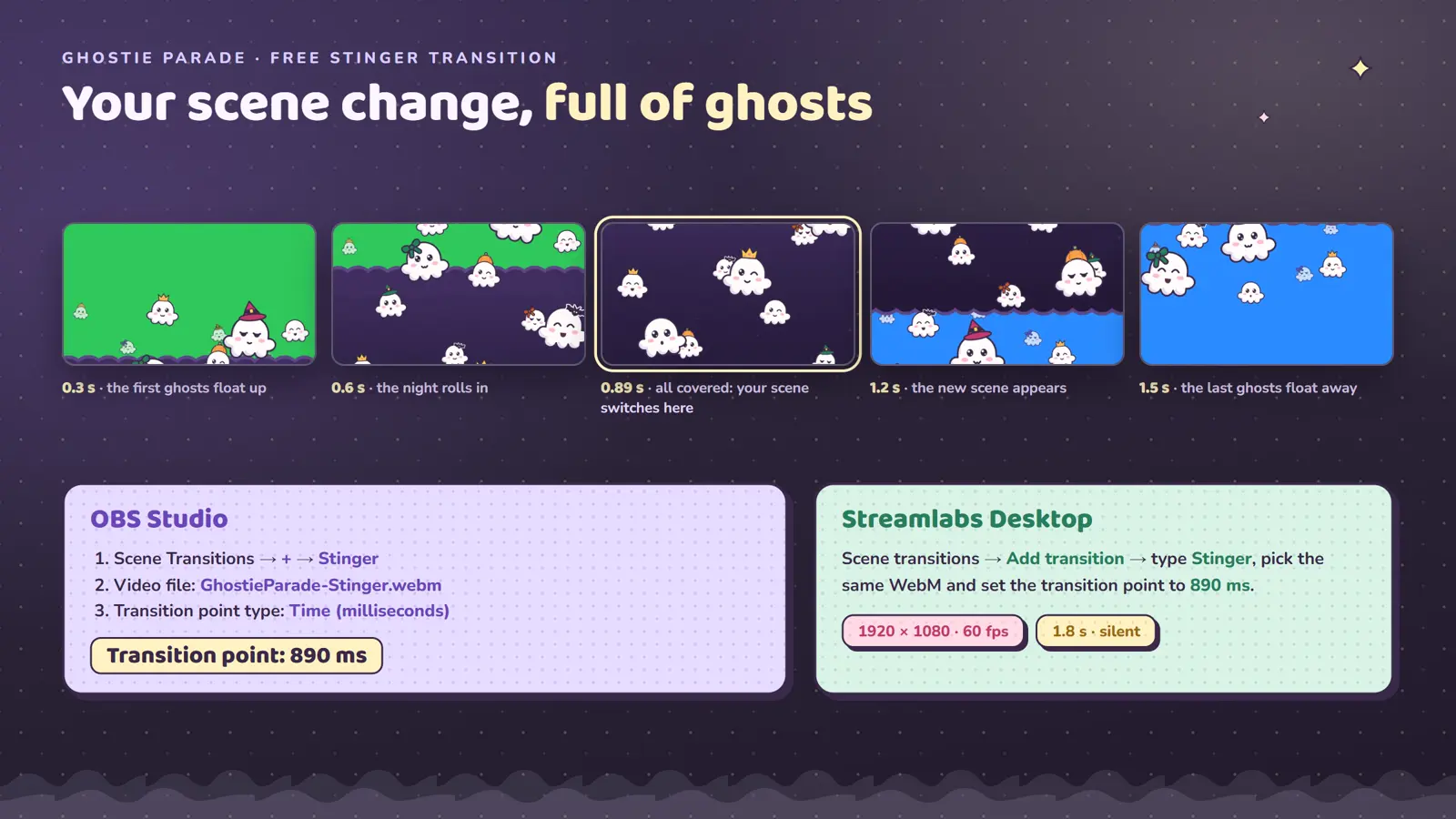
- 1920 × 1080 at 60 fps
- Transparent background
- 1.8 seconds, calm and quick
- Silent, never clashes with music
- Scales to 1440p and 4K canvases
- Works as a transition override
- Small file, about 1.4 MB
- Matches the free Ghostie Chat
Live in about a minute
You need OBS Studio, Streamlabs Desktop or any streaming software that plays a WebM video as a stinger transition.
- 1
Download the ZIP
It holds the stinger as a transparent WebM, the setup steps for OBS and Streamlabs, and the license.
- 2
Add a Stinger transition
In OBS, open Scene Transitions, click the plus and choose Stinger. Pick GhostieParade-Stinger.webm as the video file.
- 3
Set the transition point
Choose Time as the transition point type and enter 890 milliseconds. Every scene change is now a ghost parade.
Download contents and license
Inside the ZIP
- GhostieParade-Stinger.webm1920 × 1080 · 1.8 s
- How to use.txtOBS and Streamlabs steps
- LICENSE.txtTerms of use
The license in short
- Use it on your own channels, on any platform, for as long as you like.
- Use it in your streams, VODs and videos.
- Sell the file or upload it elsewhere. Share the link to this page instead.
- Use it in other products or claim it as your own work.
Questions before you download
Is Ghostie Parade really free?
Yes. You can use it on the streams and videos of your own channels at no cost. There is no sign up, no email form and no payment step. The button downloads the ZIP straight away.
Which streaming software works?
OBS Studio and Streamlabs Desktop, and any other software that plays a WebM video with transparency as a stinger transition. The stinger is a plain video file, so you need no account and no browser source.
What is the transition point?
It is the moment your software switches to the next scene: 890 milliseconds. Around that moment the night band covers the whole screen, so the cut stays hidden.
Can I use it only for some scenes?
Yes. Keep your usual transition as the default, then right-click a scene in OBS, choose Transition Override and pick Ghostie Parade.
Does it work on a 1440p or 4K canvas?
Yes. The stinger is 1920 × 1080 and OBS scales it to your canvas. The ghosts are flat, clean shapes, so they stay crisp when scaled up.
May I share the stinger with friends?
Please share the link to this page instead of the file. That way everyone gets the latest version. Selling the file or uploading it elsewhere is not allowed.
Where do I get help with the setup?
Start with How to use.txt in the ZIP. If you still get stuck, message VogelStreamAssets on Etsy.
Let the ghosts parade through your next scene change
Free for your own streams. OBS and Streamlabs, set up in about a minute.
The matching chat is free too: Ghostie Chat